How to stop rubber-stamping AI-generated code
To stop rubber-stamping AI-generated code, decide what would make you reject the change before you read it, then check exactly that. Read the ticket first, pick the cases it names, and walk them through the diff yourself. Keep the review small enough to finish in one sitting, and write in the approval what you checked. An approval given that way is evidence. An approval given because the code looked tidy and CI was green is a signature.
On 23 November 2026 CodeRabbit announced the LeadDev AI Code Review Report 2026, a survey of 377 engineers and engineering leaders. The first line of the announcement is the sentence most teams would rather not say out loud: "Seven in ten engineers say they don’t fully understand the AI-generated code they approve." Only 26% say they fully understand the AI code they review, and 68% do not always know which changes need deeper scrutiny. The report is sponsored by CodeRabbit, which sells an AI reviewer, and the numbers are what people say about themselves. Read it with that in mind. It still describes something you can watch happen on your own team on any weekday.
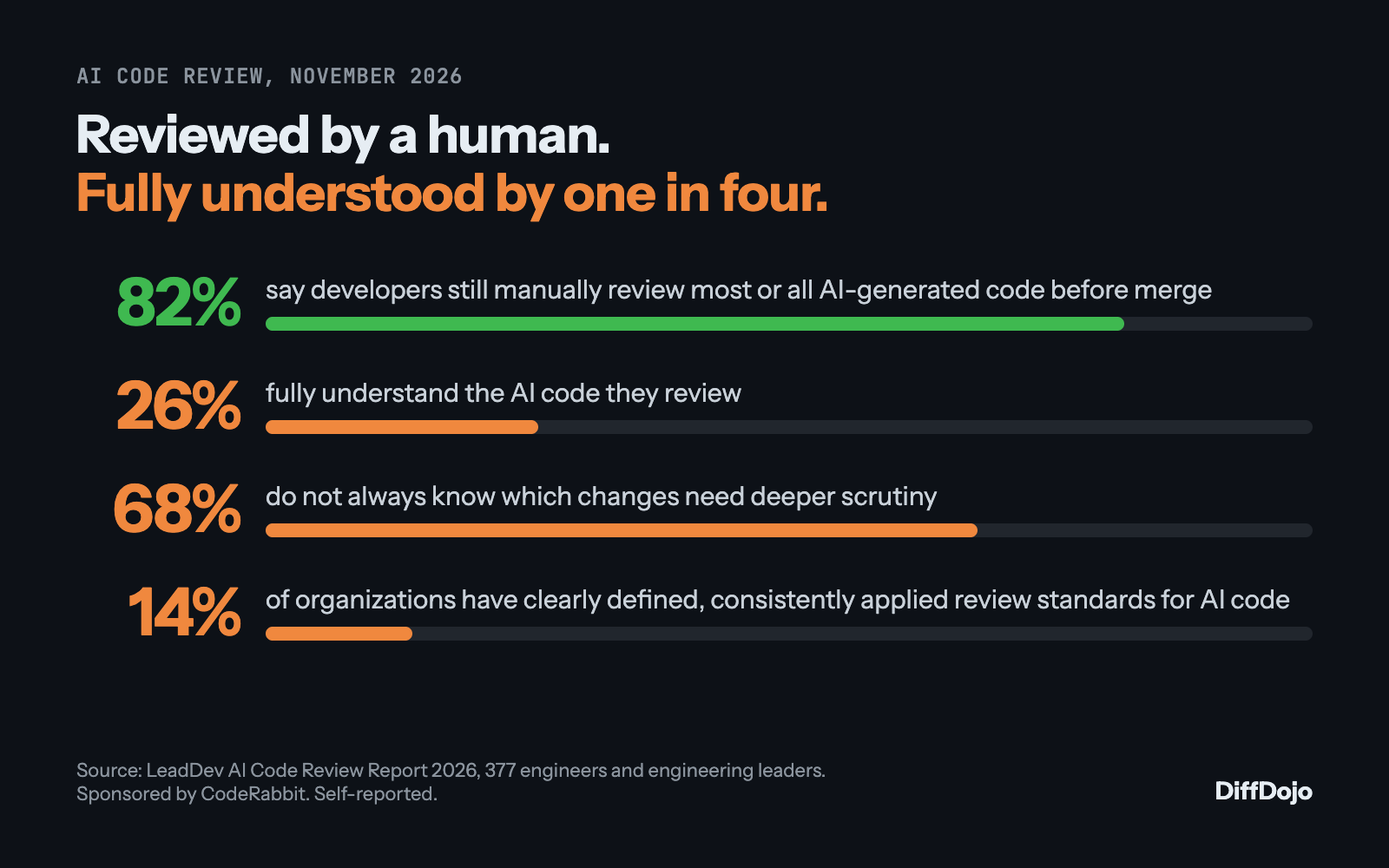
The same announcement says 82% of respondents still have developers manually review most or all AI-generated code before it merges. Put the two numbers side by side. Most teams say a human still reviews the code, and most of the people reviewing say they did not fully understand what they approved. That gap has a name: rubber-stamping.
Why AI-written code gets rubber-stamped
There is more of it than a person can read properly. Faros AI looked at telemetry from over 10,000 developers on 1,255 teams and reported that high AI adoption came with "a 154% increase in average PR size" while "PR review time increases 91%". A study of one company that set out to double merged pull requests per engineer with AI (802 developers, 196,212 pull requests) found the cost landed on review, "where load per reviewer doubled".
The old limits did not move. SmartBear's study of a Cisco team is where the familiar advice comes from: review "no more than 200 to 400 lines of code (LOC) at a time", expect "a significant drop in defect density at rates faster than 500 LOC per hour", and stop after an hour because performance drops off "after about 60 minutes". A 900-line agent PR at four in the afternoon is outside all three.
The code looks finished. Generated code is formatted, consistently named, commented and usually arrives with passing tests. Those are the signals a tired reviewer uses to decide a change is safe, and a model produces them whether the logic is right or not. In Sonar's 2026 survey of more than 1,100 developers, 96% said they do not fully trust AI-generated code, and only 48% said they always verify it before committing. People know, and fewer than half say they always check. Checking is the expensive part and nothing on the screen asks for it. This is automation complacency with a merge button.
You know nothing about the author. With a colleague's change you lean on what you know about the author. With an agent's change there is nothing to lean on, so the proof has to come from you. A survey of 239 practitioners published in October found that 55.2% treat their own reasoning through the critical cases as sufficient grounds to approve an AI-authored pull request, against 28.5% for a human-authored one. That is the right instinct, and it is the step a rubber stamp skips.
Six habits that make an approval mean something
1. Read the ticket before the diff, and name your rejection reasons
Before opening the files, read the requirements and write down one or two things that would make you reject the change: "it must handle an empty list", "a user from another tenant must get a 404". This takes a minute. It turns the review from "does this look fine?" into "does this do those things?", and the second question has an answer. Reading the diff first gets it backwards: you learn what the code does and then find the requirements agree with it.
2. Walk the named special case through the code
Tickets usually name the awkward input: the unassigned ticket, the zero quantity, the last page. Take that one value and follow it line by line. You are not reading every line with equal care. You are running one concrete input through the lines it touches. A bug in a small PR tends to sit exactly there: the model wrote the main path well and the special case by pattern.
3. Treat the PR description as a claim
"Falls back to a default." "Tested locally with several inputs." "Handles errors." An agent writes these sentences as fluently as it writes the code, and they describe the intent, not the behaviour. For each claim that matters, find the line that makes it true. If you cannot point at the line, that is your first comment.
4. Cap the size and the sitting
Past roughly 400 changed lines, the SmartBear limit quoted earlier, ask for the PR to be split, and say why. An agent can split its own work in a minute; you cannot review 1,500 lines in ten. If it truly cannot be split, review it by bug class instead of line by line and stop when the hour is up. A review finished tomorrow morning is worth more than an approval at 6pm.
5. Say what you checked in the approval
Replace "LGTM" with two lines: "Checked: null assignee, priority values, the queue with no tickets. Not checked: styling, the i18n strings." It costs twenty seconds and has two effects. The next person knows where the gaps are. And you cannot write the sentence without having done the work, which is the point. If the "checked" line comes out empty, you were about to rubber-stamp.
6. Calibrate on PRs where the answer is known
At work you almost never find out that an approval was wrong; the bug surfaces months later with someone else's name on the fix. Practice needs feedback, so review pull requests that have a known answer and compare. Include correct ones. A reviewer who has only ever trained on buggy PRs learns to reject everything, which is a different way of not reading. Approving a correct PR for stated reasons is the same skill as catching a broken one. A separate guide covers keeping your code reading sharp when an assistant writes most of the code.
Check yourself on a two-line change
Here is a small PR from an agent. The ticket says:
- The support queue renders a card for every ticket: subject, priority, an assignee line, the ticket number and open date.
ticket.assigneeis either an object with a non-emptyname, ornull. New tickets start unassigned, and that is a routine state, not an error.- Unassigned tickets must show "Assigned to: Unassigned".
The PR description says:
Adds the assignee line to the support ticket card, as the triage team asked. Falls back to 'Unassigned' when there is no assignee name. Clicked through the queue locally and every card shows the right agent.
src/components/TicketCard.jsx
+2
Decide: approve or request changes? Then open the answer.
What the review should say
Request changes. Line 8 reads .name straight off ticket.assignee, and the ticket says that value is null for every new ticket. On a null assignee the expression throws TypeError: Cannot read properties of null (reading 'name') during render, so the card fails, and without an error boundary the queue around it fails too. The || 'Unassigned' fallback never runs, because the error happens before it.
The fix is one line: const assigneeName = ticket.assignee?.name ?? 'Unassigned';
Now look at why a quick read approves it. The fallback is visible on the line. The description says "falls back to 'Unassigned'". The author clicked through the queue and saw the right agents, because every ticket in the local data had one. All three signals point at "fine". Habit 2 catches it in under a minute: take the one input the ticket names, assignee: null, and put it through line 8.
Try it yourself
This PR is in DiffDojo, open without signup.
Leave your inline comment and a verdict, and see how your review compares with the canonical one. The library also has clean PRs, where approving is the right answer.
Review this PR →What this does not mean
It does not mean approving less. If every AI pull request gets "request changes" on principle, the team learns to route around you, and the queue from the reports above gets longer. The aim is that each approval can be explained: this is what the change had to do, this is the case I tried, this is what I left alone. The review checklist and the guide to reviewing AI-generated code go through the checks themselves in more detail.
It also does not mean handing the problem to a second model. According to the same announcement, 47% of teams rely on the same AI coding agents that wrote the code to review it. That can be a useful first pass. It is not a second pair of eyes, and a clean report from it is one more green check telling the human there is nothing to see.
Common questions
How do I stop rubber-stamping code generated by AI?
Change what you do before you open the diff. Read the ticket first and write down the one or two cases that would make you reject the change. Then walk those cases through the code yourself instead of trusting the description or the green checks. Keep each review under about 400 lines and an hour, ask for anything bigger to be split, and write in the approval what you checked and what you did not. To build the habit, practise on pull requests with known answers, including correct ones where the right verdict is to approve.
What is rubber-stamping in code review?
Rubber-stamping is approving a pull request without reading it closely enough to find a defect. The approval records that a review step happened, not that the code was checked. It is most common on large diffs, on changes from trusted colleagues, and on code that has already passed CI or an AI reviewer.
Is it rubber-stamping if I approve an AI pull request quickly?
Not necessarily. Speed is not the problem; missing evidence is. A two-line change can be checked properly in two minutes if you know which case could break it and you traced that case. An approval is a rubber stamp when you could not say which failure you looked for. Some pull requests are correct, and approving them after a real check is the right call.
Can an AI reviewer stop rubber-stamping for me?
It can take a first pass and catch some of what the author model missed. It cannot own the approval. An AI review that reports nothing makes the next human reader relax, which is the same effect a green CI run has. Run it first, then spend your own attention on what it is weakest at: requirements that were quietly reinterpreted, and the special cases the ticket names.
Where can I practice reviewing AI-generated code without rubber-stamping?
DiffDojo has realistic AI-written pull requests with planted bugs, plus clean ones where the right call is to approve. You leave inline comments, give a verdict and get graded against a canonical review, so you find out whether your approvals were earned. One PR in every stack is open without signup, a free account opens one more of your choice, and the pass opens the rest of the library.
Read next When to approve a pull request: a React review exercise Read next "How do you even review AI code?" Two Reddit threads, two hundred comments, and the twenty-minute triage nobody posted